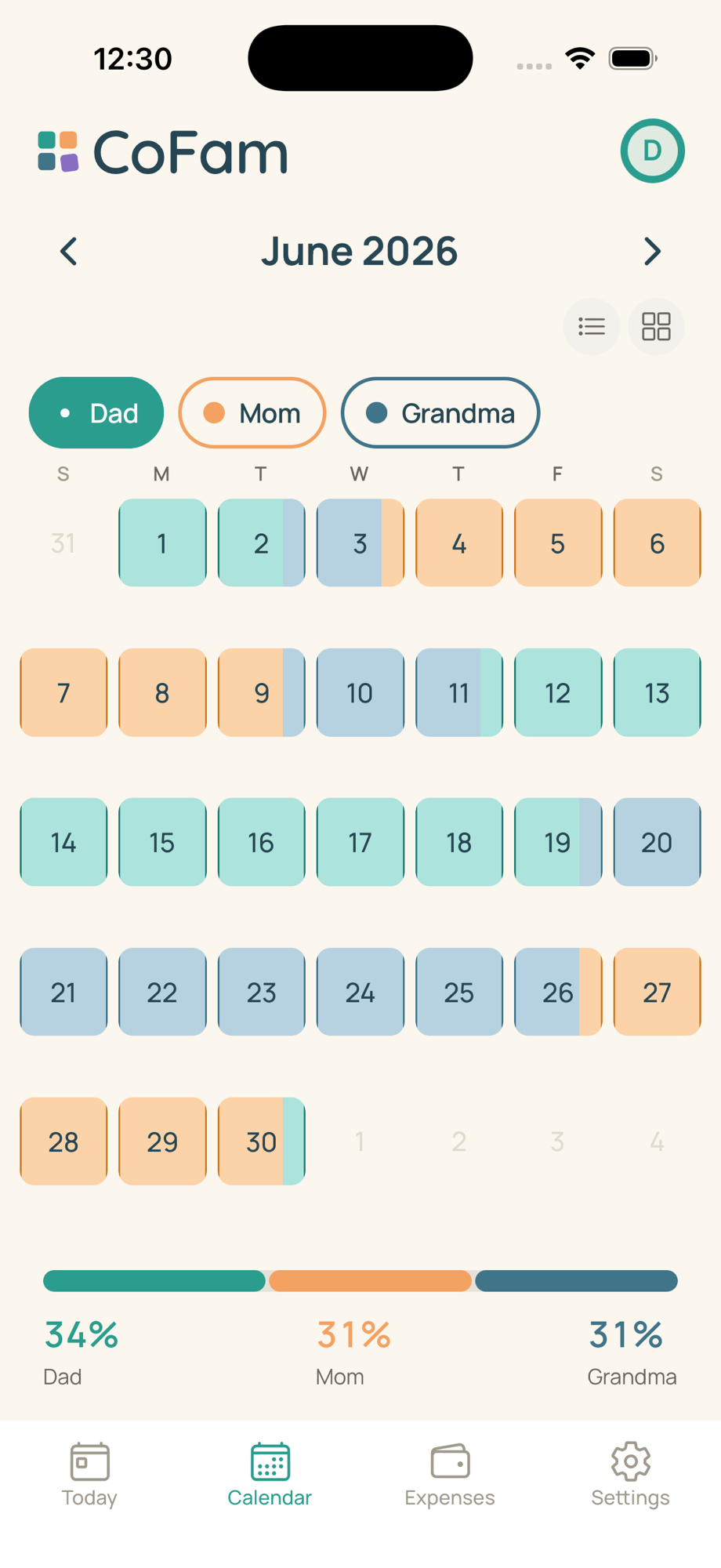
The calendar
Color = person.
Night = bridge.
CoFam assigns each parent one of twelve colors and renders overnight ownership in the gap between day cells, so a Wednesday 6pm handoff reads as half-and-half, not a full-day block.
Join the waitlist
Each person gets one of twelve identity colors
CoFam ships twelve calibrated colors positioned across the hue wheel so no two adjacent members ever land in the same color family, even with four or five caregivers in the same family. Pick a color once during onboarding and it propagates everywhere: calendar cells, handoff cards, expense splits, the time-share percentage bar at the bottom of the month view. The palette is tuned against the cream background for the most common forms of color-vision deficiency.
Overnight bridges show time between bedtimes, not midnight-to-midnight blocks
Most co-parenting apps color a full calendar day from midnight to midnight. Real handoffs don't work that way. A Wednesday pickup at 6pm means the morning belonged to one parent and the evening to the other. CoFam renders the proportional split inside Wednesday's cell: the left portion shows the morning owner, the right portion shows the evening owner.
Between cells, a 2–3px overnight bridge, a dark-variant border stroke in the owning parent's color, runs across the edge to show whose house the kids slept at. Glance at the bridge and you know without counting day blocks.
Drag-paint the schedule, then save it as a recurring rule
Setting up a custom schedule shouldn't require a template wizard. CoFam lets you drag your finger across the week to paint who has the kids. Tap the member chip at the top to switch whose color you're applying; the whole grid re-flows underneath.
When the pattern repeats, save it as a recurring schedule starting any date. 2-2-3, 5-2-2-5, alternating weeks, every-other-weekend, week-on-week-off, or hand-rolled if your family's week doesn't match a template. See the schedule patterns guide for the trade-offs between common rotations.
Up to twelve members with tiered permissions
Co-parenting often means more than two adults. CoFam holds up to twelve members across both households and separates them by permission tier: co-parent (sees everything, can edit), caregiver (sees the schedule, cannot modify), and view-only (sees pickup windows only, no other data).
A nanny on weekday afternoons gets caregiver access. The kids' school gets view-only for the pickup window. Grandma taking Thursday nights gets her own color and co-parent access if that's right for your family. The calendar layers their time without turning into a grid of overlapping bands. More on roles: The family.
Per-member iCal feeds sync to Apple, Google, and Outlook
CoFam publishes a separate iCal feed for each member so the right slice of the schedule lands in each subscriber's native calendar with the right color and event titles. The kids' school subscribes to the pickup-window feed and sees nothing else. Grandma subscribes to her feed and sees her nights. You subscribe to the full-family feed and see everything. Direct two-way Google and Outlook OAuth sync is in private beta.
The calendar is one of three surfaces, alongside Expenses and Records.
Join the waitlistAlso on iPad, Android, and Web.